
iMemories Service Review: digitizing old movies and photos
I was recently helping my mom clean out her storage cabinets when I uncovered boxes of old videos and slides from my childhood. The kind that instantly pull you back in time. Sitting on the floor sorting through them, it hit me that it was time to digitize my family memories not just for me, but for the next generation. Learn how to digitize old videos and photos to preserve family memories for future generations with iMemories- my personal review.
One day, someone you love is going to ask a question.
What were you like when you were little?
Do you have any videos of Grandma?
And in that moment, you’ll either have a story to tell — or something you can actually show. What if sharing your life’s memories was as easy as clicking a button?
That’s why I finally decided to digitize ours. It’s something I put off for years, until I found a company I truly trusted to handle our family memories safely and thoughtfully. In this post, I’m sharing the easiest and most secure way I’ve found to preserve and share those moments.
Because stories fade — but recorded memories don’t.
What Is iMemories?
iMemories specializes in preserving family memories by converting old photos, slides, film reels, and home videos into high-quality digital files. From VHS tapes and 8mm film to boxes of printed photos, they take aging, fragile media and turn it into easy-to-view, shareable digital memories you can enjoy on your phone, computer, or TV. Their whole mission is simple: protect the moments that matter most so they’re not lost to time, dust, or outdated technology.
Table of contents
- What Is iMemories?
- The Magic Hiding in Closets & Boxes
- The First Step: Trusting Your Memories to the Right Hands
- Where the Magic Happens
- From Old Tapes to Modern Devices (And a Lot of Fun)
- Why You May Want To Consider Digitizing Your Family Photos and Videos
- Bottom Line
- Most Frequently Asked Questions About iMemories
The Best Story You’ll Ever Tell (And Why Preserving Your Memories Is Worth It)
I’ve spent the last month doing something I didn’t expect to be quite so emotional—watching old family movies and sharing them with other family members as we laugh and cry together, thanks to iMemories. Seeing familiar moments pop up on the screen sparked conversations, stories, and memories we hadn’t talked about in years. It felt like gathering around the same living room again, even when we were miles apart.
I also uploaded my wedding photos from the only version I had—photo negatives. Having high quality images of our wedding has been incredibly moving. They weren’t just pictures; they were reminders of a season of life, frozen in time, suddenly vivid and accessible again.
Then came the videos. I watched my wedding video, my engagement video, and finally my old childhood videos. One after another, they told the story of how it all began and how it’s unfolded over time.
And there is something truly special about seeing yourself as a baby and a child. It sparks a kind of joy that’s hard to explain—innocent, nostalgic, and deeply grounding. It reminds you where you came from, how much has changed, and how precious these memories really are.
The Magic Hiding in Closets & Boxes
Most of us have them.
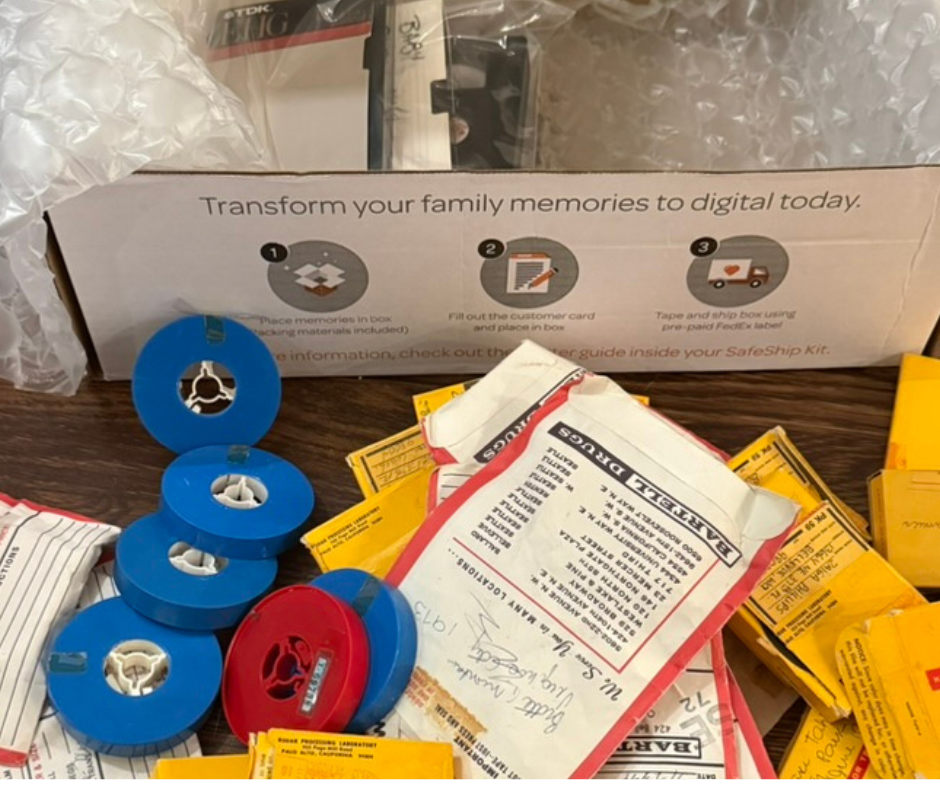
A box of VHS tapes, old home movies, old photos, photo prints, audio cassettes, mm film reels, even Kodak film canisters—all filled with analog memories captured on decades-old technology.
They hold:
- Precious family memories
- A blend of home videos, home movie footage, and favorite TV shows
- Birthdays, holidays, vacations, favorite shows, and everyday moments that once felt ordinary—but now feel priceless
These aren’t just tapes and slides. They’re your family history. Your treasured memories. Your stories waiting to be told again.

The First Step: Trusting Your Memories to the Right Hands
Let’s be honest—sending irreplaceable items through the mail can feel scary. After doing lots of research I discovered imemories. Let’s face it, it’s scary trusting a company with your precious memories.
What I discovered is that iMemories has built one of the most thoughtful digitization services out there. I was worried me was the shipping process. What if the box was lost in the process or if the contents were damaged?
I will share the process I went through to digitize our family memories in hopes it will encourage you to take the necessary steps to find the best company to help you with the process.

SafeShip Kit: It All Starts Here
With iMemories, everything begins with the SafeShip Kit—and it’s refreshingly simple.
Every customer purchases the kit, which includes:
- Waterproof bags
- A crush-proof box with shock-resistant cushions and resistant bubble cushions
- Free shipping with a pre-paid FedEx shipping label
- Clear step-by-step instructions and a welcome guide
Here’s the best part (and the part everyone loves):
You don’t need to organize, label, or barcode anything.
No sorting! No sticker labels on every tape! No spreadsheets! Just load it up, seal the crush-proof box, and ship it to imemories.
It’s the easiest way and the smartest way to protect irreplaceable items—with real peace of mind.
Where the Magic Happens
After I shipped off my box, a few days later I received an email that the box was received by imemories. I took a deep breath.
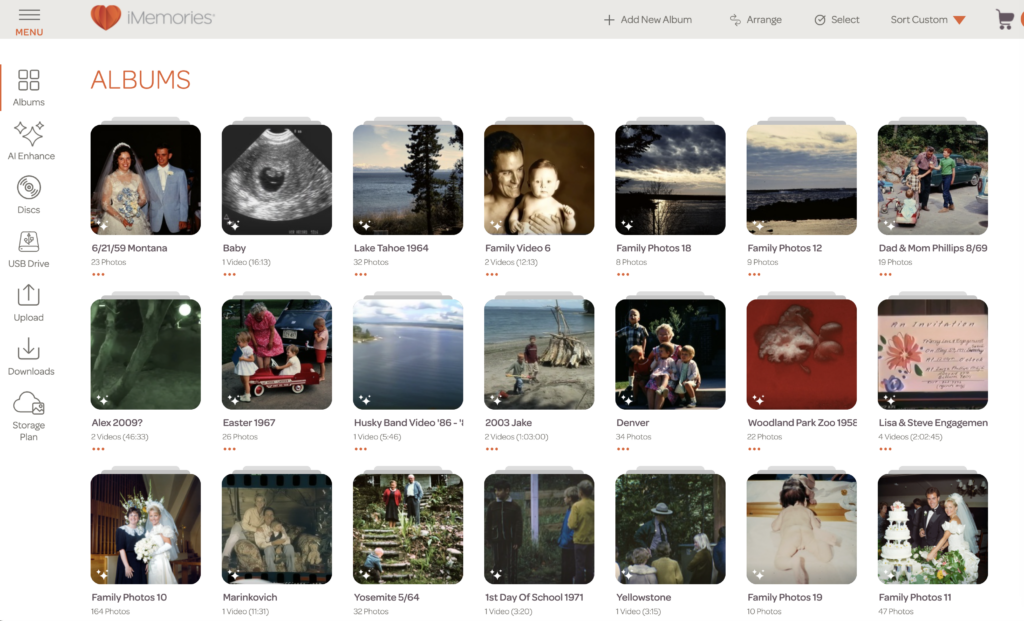
Once my box arrived at iMemories’ art facility, the digitization experts and digital restoration specialists (who truly understand the quality of our digitization) starting working.
They take inventory of every asset and then I got an email quote with the cost to digitize it all. This is where your 50% OFF code (GALPAL) will be valuable.
Their focus:
- Color accuracy
- A natural look
- Picture-perfect clarity
- Preserving the true feel of your memories
Your old videos, home movie footage, and even Hollywood movies recorded at home are carefully transformed through professional digital conversion—not rushed, not overdone.
This is where your memories get new life.
From Old Tapes to Modern Devices (And a Lot of Fun)
After it’s all been digitized, you’ll be able to download everything to your computer for 30 days, completely free. From there, you can put it on a separate hard drive or burn your own DVDs if you’re so inclined.
iMemories can also put the files on a USB drive, DVDs, or an external hard drive for a fee. But honestly, hardly anyone has a DVD player anymore and families don’t gather around the computer to watch movies, so the most popular option is our cloud streaming service.
It allows you to stream all of your digitized memories to your phone, TV, or tablet through the iMemories app. Think Netflix for home movies. No other company has that and it’s one of our customers’ favorite features.
The Digital Devices: Your memories come back as:
- Digital files
- Digital copies viewable on smart TVs, mobile devices, and modern devices
- Access through the iMemories app (yes, from your favorite app store)
- Compatibility with Android phones
- Optional USB thumb drive
- A free 30-day trial of iMemories Cloud
Now, story night looks different.
You’re watching videos on the big screen, laughing together, sharing clips on social media, and hearing stories retold—with proof.
| ✅ Pros | ⚠️ Cons |
|---|---|
| Extremely easy, hands-off process — no technical skills required | Pricing can add up once digitization, add-ons, and storage are included |
| Accepts a wide range of formats (VHS, 8mm, slides, film, photos, DVDs) | iMemories Cloud requires a paid subscription after the free trial |
| Secure SafeShip kit and careful handling of original media | Final video quality depends on the condition of your original tapes or film |
| Cloud access makes viewing and sharing memories simple across devices | Mailing irreplaceable memories can feel stressful, even with tracking |
| Free 30-day cloud access included with every digitization order | Optional physical copies (USBs, DVDs, hard drives) cost extra |
Would I Recommend imemories To Preserve Your Memories?
The answer is “YES”. I don’t have any complaints. The only issue I need to figure out is where we will save these digital videos for the entire family. I don’t want to have to keep my photos and videos on the imemories cloud forever.
Why You May Want To Consider Digitizing Your Family Photos and Videos
One day, these won’t just be your memories.
They’ll belong to future generations—kids and grandkids who want to know where they came from, what life looked like, and who their people were.
Preserving your memories means:
- Keeping your family photo albums alive
- Saving moments from fading away
- Turning fragile formats into a lasting digital version
- Giving your stories a future
And judging by the thousands of positive reviews, happy customers, mentions from Fast Company, and recognition as one of the most innovative companies and best companies in this space—iMemories delivers.
Bottom Line
Time passes. Technology changes.
Stories are forever—if we save them.
Preserving your memories with iMemories isn’t just about storage or files. It’s about honoring your past, celebrating your present, and passing something meaningful forward.
It’s the smartest way to protect what matters most—and one of the most meaningful gifts you can give your family.
And honestly?
Reliving it all again is a lot of fun. 💛
Most Frequently Asked Questions About iMemories
What formats does iMemories convert?
iMemories makes it incredibly easy to bring old memories into the digital age this includes:
- Videotapes: VHS, VHS-C, Betamax, 8mm, Hi8, Video8, Digital8, MiniDV, MicroMini
- Movie Films: 8mm, Super 8, and 16mm (with or without sound)
- Photos: Printed photos, slides, and negatives
- Discs: DVDs and MiniDVDs
Is the iMemories app free?
Yes! The iMemories app itself is completely free to download and use.
That said, iMemories Cloud is required for unlimited viewing, sharing, and long-term storage. Every digitization order includes a free 30-day trial of iMemories Cloud.
After that, you can choose to continue with a subscription for $7.99 per month or $49.99 per year if you want ongoing access, sharing, and storage.
How do I share my memories with family?
This is one of my favorite parts. iMemories Cloud lets you access and share your memories from just about anywhere. Your photos and videos are securely stored and can be viewed through the iMemories app on:
- iPhone and iPad
- Android phones and tablets
- PC or Mac
- Select Smart TVs
It makes it simple to find, watch, and share family memories with everyone — without mailing DVDs or passing around hard drives.
Can iMemories convert recorded TV shows or Hollywood movies from VHS tapes?
No — iMemories can’t digitize copyrighted material like TV shows or Hollywood movies.
However, if a tape includes a mix of home videos and recorded TV or movie footage, the copyrighted portions will be removed and your home movie footage will still be preserved.
Do I need to organize or label my tapes and photos first?
Not at all — and this is such a relief. You don’t need to label, barcode, or organize anything before sending it in. iMemories takes care of the inventory and organization for you once your items arrive.
What happens after iMemories receives my memories?
Once your box arrives, iMemories carefully inventories everything and sends you an email with a digitization quote. After you approve it, they begin the digitizing process. When it’s complete, you’ll be able to view and download your memories through iMemories Cloud.
How long can I download my digitized files?
You’ll have 30 days of free downloads once your digitized memories are ready. During that time, you can download everything to your computer or transfer files to a hard drive. You can also choose optional storage solutions like USBs, DVDs, or external hard drives for an additional fee.
Are my memories safe?
Yes. Your photos and videos are handled with care and securely stored in iMemories Cloud.
Who is iMemories best for?
Honestly? Anyone with boxes of old tapes, film reels, or photos they don’t want to lose.
It’s especially wonderful for families, parents, grandparents, and anyone who wants to preserve memories and make them easy to share with the next generation.