
How to Manage Technology for a Healthier Daily Life
There was a time when I felt like technology was supposed to make everything easier, but instead it just made life feel more complicated. Eventually, I realized that the problem wasn’t technology itself — it was the way I was using it. Learn how to manager technology use for a healthier life. Explore the following digital habits reset guide: Common problems and easy fixes.
Key Takeaways
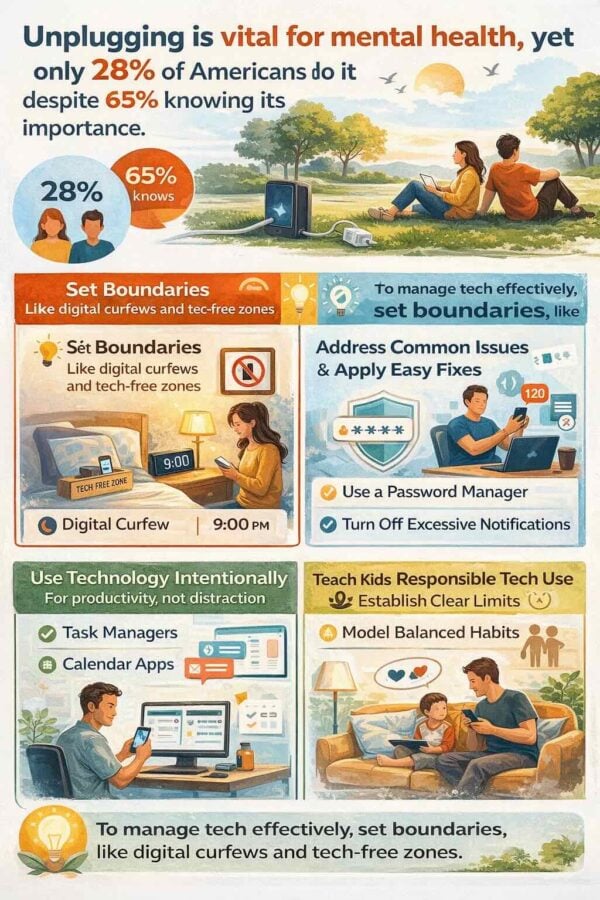
- Unplugging is vital for mental health, yet only 28% of Americans do it despite 65% knowing its importance.
- To manage technology effectively, set boundaries, like digital curfews and tech-free zones.
- Identify common issues like weak passwords and excessive notifications, and apply easy fixes such as using a password manager and turning off non-essential alerts.
- Leverage technology intentionally for productivity with tools like task managers and calendar apps, enhancing focus instead of distraction.
- Teach kids about responsible tech use, establish clear limits, and model balanced habits to foster a healthy relationship with devices.
A 2013 survey by APA’s Center for Organizational Excellence found that digital technology helps people to be more flexible and more productive, and makes it easier to get work done. The catch is to take active steps to manage your technology use so the cons don’t override the pros. In this post we share some simple tips to do so. Need a digital detox? See tips here.
Let’s be honest we all know that “unplugging” is healthy for us. In fact, 65% of Americans somewhat or strongly agree that periodically ‘unplugging’ or taking a ‘digital detox’ is important for mental health, yet only 28% actually do so.
Technology That Works For You, Not Against You
By 2026, our phones, smartwatches, and laptops have woven themselves into every corner of daily life—work calls, parenting logistics, wellness tracking, staying connected with loved ones. There is a smart way to go about this!
Since smartphones became mainstream around 2010, internet and social media have delivered both remarkable empowerment and quiet exhaustion. The constant access can feel like a gift and a burden in the same breath.
Here at Gal Pal Lifestyle, we believe the answer isn’t retreating from the digital world entirely. It’s learning to safely use technology to be more effective in life—staying calm, present, and in control. We blend lifestyle inspiration with practical digital tools to help you feel empowered by your devices, not overwhelmed. Let’s explore the benefits, the hidden costs, and the systems that actually work.

18 Digital Lifestyle Common Problems and Easy Fixes
The following are unhealthy digital lifestyle habits. We share how to fix our daily digital habits in order to manager technology for a healthier life.
1. Problem: Late-night screen time is ruining your sleep
Scrolling emails or social media right before bed can delay sleep and overstimulate your brain.
How to Fix It:
Set a digital curfew. No work email after 8:30 p.m. and no social media after 10 p.m. This simple boundary can improve sleep onset by 20–30 minutes.
2. Problem: Weak or reused passwords put your accounts at risk
Using the same password makes it easier for hackers to access multiple accounts.
How to Fix It:
Use a password manager to create and store strong, unique passwords for every site.
3. Problem: Your bedroom isn’t a true place to rest
Phones in the bedroom often lead to late-night scrolling and stressful morning habits.
How to Fix It:
Charge your phone outside the room and use an analog alarm clock to avoid the scroll trap.
4. Problem: You’re always “on” and never unplugged
Constant device use during meals or downtime keeps your brain overstimulated.
How to Fix It:
Create tech-free zones—no devices at dinner, in bathrooms, or during the first 30 minutes after getting home.
5. Problem: Too many notifications are draining your focus
Endless alerts create distraction and low-level stress.
How to Fix It:
Turn off non-essential notifications. Keep only calls from favorites and calendar reminders.
6. Problem: No intentional time offline
If you don’t plan time away from screens, it rarely happens.
How to Fix It:
Create offline rituals like screen-free Sunday mornings or one evening a week for reading, cooking, or gardening.
7. Problem: Kids and teens have no clear tech boundaries
Without structure, screen time can take over family life.
How to Fix It:
Create a family media plan with rules for mealtimes, overnight charging, and age-appropriate limits.
8. Problem: You’re not backing up important files
A lost file or crashed hard drive can derail productivity and cause stress.
How to Fix It:
Use automated cloud backup solutions to keep your data secure and recoverable.
9. Problem: You’re working without cloud collaboration tools
Emailing files back and forth wastes time and creates version control issues.
How to Fix It:
Use platforms like Microsoft Teams or Google Workspace for real-time collaboration and file sharing.
10. Problem: Your digital files are disorganized
Searching through messy folders wastes time and creates frustration.
How to Fix It:
Use a standardized folder structure and consistent file-naming system with searchable cloud storage.
11. Problem: You’re not using two-factor authentication
Even strong passwords can be compromised without an extra layer of security.
How to Fix It:
Enable two-factor authentication (2FA) for email, banking, and social accounts.
12. Problem: You’re not updating your devices
Outdated software leaves you vulnerable to bugs and security risks.
How to Fix It:
Turn on automatic updates for your phone, computer, and apps.
13. Problem: Your screen time is higher than you think
Excess screen time can impact productivity, focus, and mental health.
How to Fix It:
Check your screen time weekly and set app limits where needed.
14. Problem: You’re starting and ending your day with your phone
This creates a reactive mindset and increases stress.
How to Fix It:
Create a simple morning and evening routine without screens.
15. Problem: Your email inbox controls you
Constant email checking keeps you in reactive mode.
How to Fix It:
Set designated times to check email and turn off push notifications.
16. Problem: You don’t declutter your digital life
Unused apps, subscriptions, and clutter create mental noise.
How to Fix It:
Do a monthly digital clean-up—delete apps, unsubscribe, and organize files.
17. Problem: You’re experiencing digital burnout
Too much screen time can affect mood, focus, and overall well-being.
How to Fix It:
Schedule mini digital detoxes—even a few hours offline can reset your nervous system.
18. Problem: You don’t have boundaries with work tech
Work bleeding into personal time leads to burnout and poor work-life balance.
How to Fix It:
Set clear boundaries—log off at a set time, limit work apps on your phone, or use separate devices.
The Power Of Technology: How It Can Make Everyday Life Easier and Safer
When used with intention, technology genuinely enhances people’s lives. Here’s what’s working well:
- Connection across distance: Video calls keep family and friends close, no matter the miles. Telehealth appointments, routine since 2020, cut scheduling stress in half.
- Productivity tools: Apps like Google Calendar, Notion, and Todoist help you time-block work, family activities, and self-care—reducing mental load by getting everything out of your head. Using AI-powered virtual assistants can streamline scheduling and task organization.
- Wellness support: Wearables like Apple Watch and Fitbit track heart rate, sleep quality, and physical activity. Mindfulness apps like Calm offer 5-10 minute resets. Period-tracking apps provide body awareness across hormonal cycles.
- Social and emotional benefits: Group chats maintain friendships across cities. Private online communities offer advice, support, and genuine connection.
- Professional growth: Online courses through Coursera or Skillshare open new skills and career paths. LinkedIn networking has helped active users see 15-20% career advancement.
The Hidden Costs: When Technology Quietly Drains Your Energy
The same tools that enhance life can quietly erode well being when used without awareness:
- Mental strain: Constant notifications create an “always on” culture. Research shows it takes about 11 minutes to regain focus after each interruption. Checking email before 7 a.m. or after 9 p.m. most days fuels anxiety and irritability.
- Physical effects: Eight-plus hours at a screen causes digital eye strain (affecting roughly 70% of users), text-neck, and wrist pain. Blue light exposure after 10 p.m. disrupts melatonin, reducing sleep quality by up to 30%.
- Emotional toll: Instagram and TikTok fuel comparison and FOMO. The pressure to respond instantly—especially while juggling caregiving and career—creates stress that compounds over time.
- Online toxicity: Doomscrolling news, heated comment sections, and cyberbullying impact mood and sense of safety, particularly for young people and women.
- Evidence on mental health: Heavy, unstructured social media use is repeatedly linked with increased depression and anxiety, especially among teens and young adults.
Easy Strategies To Manage Technology Use
Designing Healthy Boundaries With Your Devices
Creating clear boundaries isn’t about deprivation—it’s about reclaiming control. Here are ideas you can try this week:
Using Technology To Be More Effective At Work And Home
With the right systems, technology becomes a tool for focus rather than distraction:
- Time-blocking: Use Google Calendar or Outlook to color-code work, family, and self-care blocks. Turn on Do Not Disturb during deep work—this can yield 2-3x productivity gains.
- Task managers: Apps like Todoist or Asana prevent mental overload. Brain dump weekly to-dos, assign due dates, and batch similar tasks (emails, calls, errands) together.
- Automation: Set calendar reminders for bills, use grocery list apps like AnyList for shared household lists, and leverage smart speakers for hands-free timers while cooking.
- Communication boundaries: Keep work on Slack or Teams, personal threads in messaging apps. Check each at set intervals rather than constantly monitoring.
- Domestic coordination: Recipe apps, meal-planning tools, and shared family calendars ensure everyone knows activities and appointments.
At Gal Pal Lifestyle Blog, we love reviewing digital tools and chic tech accessories that support an organized, beautiful daily life—because education and style can absolutely coexist.
Technology For Wellness, Beauty, And Home Life
Here’s how to create a positive relationship with tech across wellness, beauty, and home:
- Wellness: Use fitness trackers for step goals and heart-rate awareness. Meditation apps deliver 5-10 minute daily resets linked to reduced stress markers.
- Beauty and self-care: Skincare and cycle-tracking apps remind you of mask nights, retinol nights, or hormonal days that may affect skin or mood.
- Sleep support: White noise apps, sleep stories, and smart bulbs that dim automatically support better rest—while still keeping screens off 30-60 minutes before bed.
- Home design: Pinterest and Instagram help plan room makeovers and garden layouts. Just set a timer to avoid passive consumption and endless scrolling.
- Entertaining: Digital recipe organizers and online shopping through grocery delivery make hosting stress-free.
Raising Tech-Smart Kids And Teens
Children born after 2010 are true digital natives. Our job isn’t just teaching how to use digital devices—it’s teaching how to use them well.
- Start conversations at an early age: Explain that devices are for learning, creativity, and connection—not just entertainment.
- Structure use: Shared family passwords for younger kids, devices in common areas only, no phones behind closed doors at night to protect privacy and sleep.
- Use parental controls: Apple Screen Time and Google Family Link set daily limits and age filters without being punitive.
- Model balance: Put phones away at dinner, skip work messages during soccer games, take regular tech breaks. Research suggests modeling yields 30-50% better child habits.
- Teach digital literacy: How to spot fake news, why to protect privacy, what to do if they see bullying or disturbing online activity.
- Watch for red flags: If social media seems to increase sadness, anxiety, or withdrawal in teens, scale back and seek support from a pediatrician or counselor.
Simple Digital Detox Rituals You Can Actually Stick With
Forget extreme challenges. Sustainable progress comes from small, repeatable practices:
- Micro-detoxes: Take 10-15 minute breaks every 90 minutes of screen work. Step outside, stretch, or make tea with no phone.
- Morning ritual: Spend the first 20-30 minutes after waking offline—journaling, stretching, or enjoying coffee in quiet.
- Evening wind-down: Reserve the last 30-60 minutes before bed for reading or low-tech routines.
- Weekly offline time: One evening “offline after dinner” or a weekend morning with phones on airplane mode while walking or visiting the farmers’ market.
- Seasonal app audit: Once per season, delete apps that no longer serve you and unsubscribe from cluttered email lists.
Pair these moments with tangible comforts—candles, cozy throws, a favorite mug—to reinforce that extra time offline feels restorative, not like punishment.
Conclusion: Let Technology Amplify The Life You Actually Want
Technology in 2026 is neither hero nor villain. Its impact depends entirely on how we design it into our routines. With thoughtful boundaries, curated apps, and consistent habits, digital technology supports creativity, connection, and effectiveness—rather than stress.
Here’s my suggestion: choose one boundary, one tool, and one detox ritual from this article to experiment with this week. Small shifts create real progress without overwhelm.
At Gal Pal Lifestyle Blog, we’re here to help you design a life that feels intentional, stylish, and grounded. Technology gets to be a helpful sidekick—never the main character.
FAQ: Safely Using Technology To Be More Effective
How many hours of screen time per day is considered healthy for adults?
Research suggests well being tends to drop when recreational screen time regularly exceeds about 3-4 hours daily, outside of work responsibilities. Quality matters as much as quantity—intentional use for learning, connection, and creativity is less draining than mindless scrolling. Rather than obsessing over a single number, aim for regular off-screen breaks during work and clear nightly cut-off times.
What is the safest way to use my phone as an alarm without ruining my sleep?
Enable Do Not Disturb or Focus modes overnight so only truly urgent calls come through. Place the phone across the room to discourage late-night checking and help you actually get out of bed. For instance, an inexpensive analog alarm clock remains the best solution if you want a completely screen-free bedroom sanctuary.
How can I stop checking work emails at night without hurting my career?
Have a clear conversation with managers about typical response windows (for example, 8 a.m.–6 p.m. on weekdays). Turn off push notifications for email in the evening, and if necessary, schedule one quick check at a set time. An email signature indicating when you typically reply sets professional expectations respectfully.
What are some red flags that my technology use is becoming unhealthy?
Warning signs include regularly sacrificing sleep for scrolling, feeling anxious when away from your phone, hiding use from loved ones, or noticing performance slip at work or in schools. Emotional clues matter too—feeling consistently worse after using certain apps. If tech use feels out of control, seek support from a therapist or trusted friend.
Are digital wellness and productivity apps really worth using?
These tools add real value when they replace disorganized habits rather than add complexity. Start with one or two key apps—perhaps a calendar and a habit tracker. Evaluate each monthly: if it doesn’t save time, reduce stress, or support your goals, delete it. The advantage comes from simplicity, not accumulation.